Make pixels into data
Tell it what matters: color, location, or both. Could a white dog and a white wall end up together?
LAB 03 / CLUSTERING + COMPUTER VISION
This Colab notebook uses k-means to group pixels and a pretrained detector to identify objects in the resulting regions.
You will write the clustering algorithm, inspect its results, and compare clustering with classification and regression.
In Colab, choose File → Upload notebook and select the download.
Normal CPU runtime · No API key · Google account needed to run
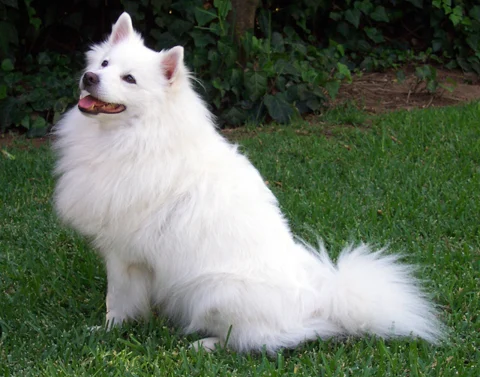 01 / ORIGINAL IMAGE
Predict first: will the white fur and green grass form different groups?
Sample: PyTorch Hub · Actual run settings & outputs ↗
Saved notebook results shown here; Python runs in Colab.
PART A / DISCOVER GROUPS
K-means assigns pixels to their nearest cluster centers, updates those centers, and repeats until the groups stop changing.
Tell it what matters: color, location, or both. Could a white dog and a white wall end up together?
Every pixel joins its nearest center. Every center moves to its group’s average. That’s the “means” in k-means.
Drag from the first step to the last. Find one pixel that switches groups. What changed if the pixel’s color stayed the same?
Try 5 groups, then 8. How does the number of groups affect the image?
Will a white dog and a white wall belong to the same group?
PART B / RECOGNIZE OBJECTS
Clustering assigns group IDs based on pixel measurements. A separate trained detector supplies possible object names.
Pick a point on the dog. Does its group contain the whole animal, or just some fur?
A patch of fur or a dog-shaped crop: which is easier to recognize? Change the padding and test it.
Borrow a model trained on labeled photos. Check one proposed name against what you can see.
Raise the score threshold. Which guesses disappear? Bring one good guess and one mistake to the group.
You build it. No object labels are supplied.
A model learned from labeled images supplies names.
The detector knows a fixed set of common categories. A cluster can split one object or mix several objects; region overlap is an association rule, not proof that every cluster pixel belongs to an object.
CLUSTERING, CLASSIFICATION, AND REGRESSION
The notebook includes examples of each method and questions about when to use them.
K-means forms K groups without using labels.
“Which pixels are similar?”KNN uses the labels of the K nearest examples.
“Which color label fits?”In this example, regression predicts pixel brightness from measured values.
“About how bright?”Same letter, different job: K groups in k-means. K neighbors in KNN.
The notebook’s KNN example labels colors; the object detector is a separate pretrained neural network. KNN can also predict numbers by averaging neighbors’ values.
USING YOUR OWN PHOTO
The notebook includes pixel clustering, KNN color classification, brightness regression, and object detection.
Get the Colab notebook ↓Follow the rounds →Use a photo that Pillow can open, such as JPEG, PNG, or WebP, up to 20 MB. Convert HEIC/RAW first. The first frame of an animated image is used; transparency is shown on white. Large images are resized while preserving their aspect ratio.
Your image is uploaded to your Google Colab runtime and processed there. It is not uploaded to this website or an image-recognition API. Notebook outputs may contain your photo; review them before sharing.
The notebook uses a CPU runtime and needs no paid model API or key. You need a Google account to run Colab; free runtime resources are subject to availability. The detector weights download once per fresh runtime, about 13.4 MB. Colab generally includes PyTorch; the notebook explains setup and a CPU fallback.
The detector has a fixed vocabulary and can miss objects. Pick another cluster, allow more crop context, inspect your score/overlap filters, or try a clearer image of a supported category. A color cluster is not an object boundary, and recognition is not guaranteed for every image.
Torchvision SSDLite model documentation · SciPy connected regions · Colab FAQ. The notebook includes links and explains the distinction between unsupervised grouping and pretrained supervised recognition.